

AntiDebug Breaker AntiDebug Breaker
  • Home
  • Overview
  • Installation
  • Quickstart
  • Scripts
  • ๐Ÿ”’ AntiDebug
  • Bypass Debugger
  • hook log
  • Hook table
  • hook clear
  • hook close
  • hook history
  • Fixed window size
  • Locate navigation code
  • ๐Ÿ” Crypto Hooks
  • Hook CryptoJS
  • Hook JSEncrypt
  • Hook SM-crypto
  • ๐Ÿช API Hooks
  • Fixed-value Hooks
  • Observation Hooks
  • Keyword-filtered Hooks
  • ๐ŸŸข Vue
  • Get routes
  • Clear redirects
  • Clear navigation guards
  • Enable Vue Devtools
  • ๐Ÿ”ต React
  • Get routes
  • Use cases
  • FAQ
  • Team tools
  • Sponsors
  • GitHub (opens new window)
Home
Overview
Installation
Quickstart
  • ๐Ÿ”’ AntiDebug

    • Bypass Debugger
    • hook log
    • Hook table
    • hook clear
    • hook close
    • hook history
    • Fixed window size
    • Locate navigation code
  • ๐Ÿ” Crypto Hooks

    • Hook CryptoJS
    • Hook JSEncrypt
    • Hook SM-crypto
  • ๐Ÿช API Hooks

    • Fixed-value Hooks
    • Observation Hooks
    • Keyword-filtered Hooks
  • ๐ŸŸข Vue

    • Get routes
    • Clear redirects
    • Clear navigation guards
    • Enable Vue Devtools
  • ๐Ÿ”ต React

    • Get routes
Use cases
FAQ
Team tools
Sponsors
GitHub (opens new window)
  • ็ฎ€ไฝ“ไธญๆ–‡
  • English
  • Home
  • Overview
  • Installation
  • Quickstart
  • Scripts
  • ๐Ÿ”’ AntiDebug
  • Bypass Debugger
  • hook log
  • Hook table
  • hook clear
  • hook close
  • hook history
  • Fixed window size
  • Locate navigation code
  • ๐Ÿ” Crypto Hooks
  • Hook CryptoJS
  • Hook JSEncrypt
  • Hook SM-crypto
  • ๐Ÿช API Hooks
  • Fixed-value Hooks
  • Observation Hooks
  • Keyword-filtered Hooks
  • ๐ŸŸข Vue
  • Get routes
  • Clear redirects
  • Clear navigation guards
  • Enable Vue Devtools
  • ๐Ÿ”ต React
  • Get routes
  • Use cases
  • FAQ
  • Team tools
  • Sponsors
  • GitHub (opens new window)
Home
Overview
Installation
Quickstart
  • ๐Ÿ”’ AntiDebug

    • Bypass Debugger
    • hook log
    • Hook table
    • hook clear
    • hook close
    • hook history
    • Fixed window size
    • Locate navigation code
  • ๐Ÿ” Crypto Hooks

    • Hook CryptoJS
    • Hook JSEncrypt
    • Hook SM-crypto
  • ๐Ÿช API Hooks

    • Fixed-value Hooks
    • Observation Hooks
    • Keyword-filtered Hooks
  • ๐ŸŸข Vue

    • Get routes
    • Clear redirects
    • Clear navigation guards
    • Enable Vue Devtools
  • ๐Ÿ”ต React

    • Get routes
Use cases
FAQ
Team tools
Sponsors
GitHub (opens new window)
  • ็ฎ€ไฝ“ไธญๆ–‡
  • English
BestProxy BestProxy ยท 10% off code ZCTYUH90 RapidProxy RapidProxy ยท 10% off code 0xsdeo
  • FAQ
    • General Questions
      • Q: Why can't I load the extension from source?
      • Q: Why isn't a script working, or why is there no console output?
      • Q: Why don't keywords or fixed values configured in the Hook section take effect?
    • Script Questions
      • Q: What should I do if Bypass Debugger doesn't work?
      • Q: What should I do if the redirect interception script doesn't work?
      • Q: What if I still can't open DevTools with F12 after enabling the anti-debugging scripts?
      • Q: Why is nothing captured when I try to extract encryption parameters?
      • Q: How do I get the padding and cipher mode?
      • Q: Why can't I encrypt or decrypt using the captured parameters?
      • Q: Why can't I extract Vue routes?
      • Q: Why am I redirected to the login page after clearing navigation guards?
      • Q: Why can't the React script retrieve routes?
    • Technical Questions
      • Q: How do I report a bug or request a feature?
  • FAQ
0xsdeo
2026-05-28
Contents

FAQ

BestProxy BestProxy ยท 10% off code ZCTYUH90 RapidProxy RapidProxy ยท 10% off code 0xsdeo

# FAQ

# General Questions

# Q: Why can't I load the extension from source?

A: Possible reasons:

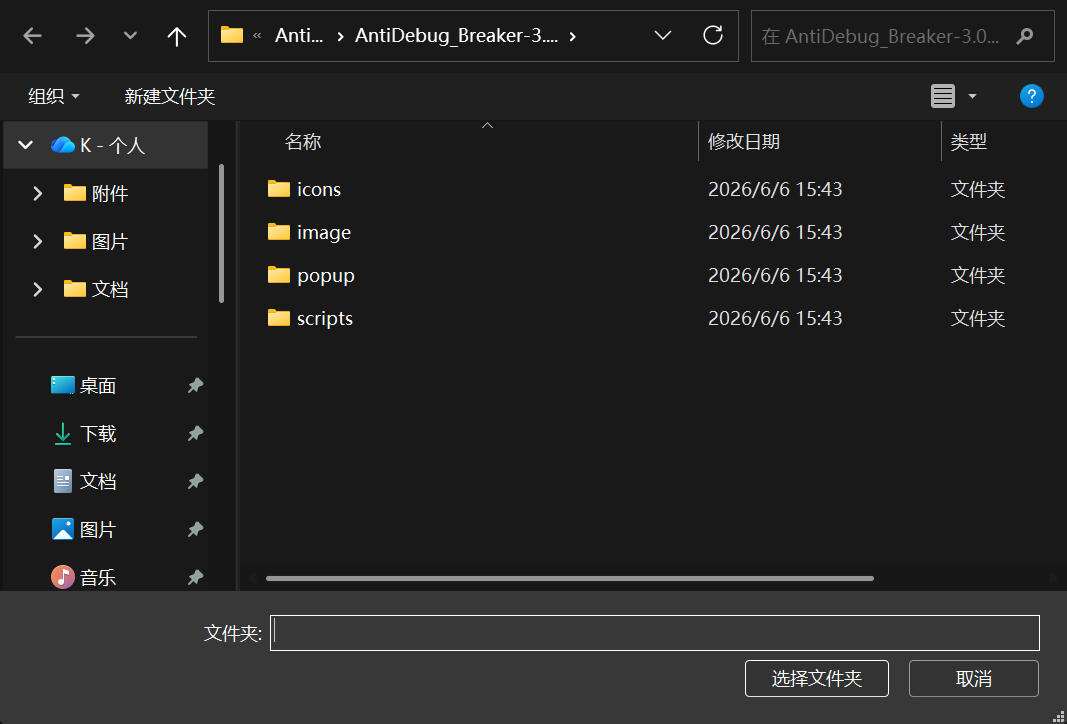
  • You did not select the source code's root directory. When importing the extension, make sure you select the root directory:

  • You may be trying to load it in Firefox. The extension does not currently support Firefox; support is planned for the future.

# Q: Why isn't a script working, or why is there no console output?

A: Possible reasons:

  • The page needs to be reloaded. Reload the page after enabling or disabling any script so that injection settings take effect.
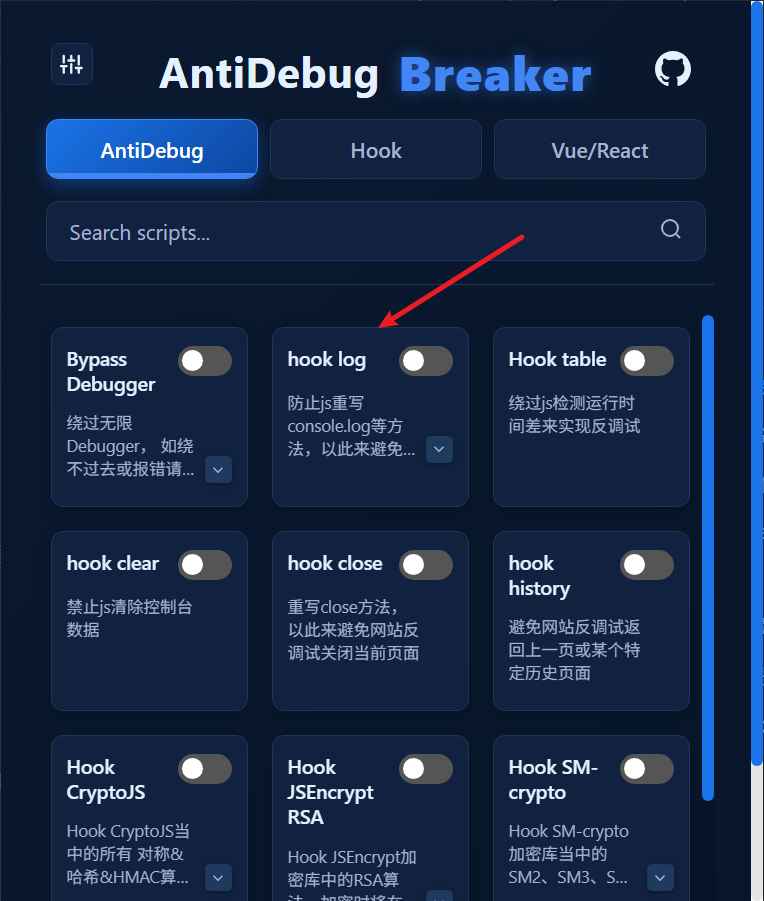
  • console.log may have been disabled. Check whether Hook log is enabled. Console output depends on console.log working correctly. If the script is disabled, try enabling it:

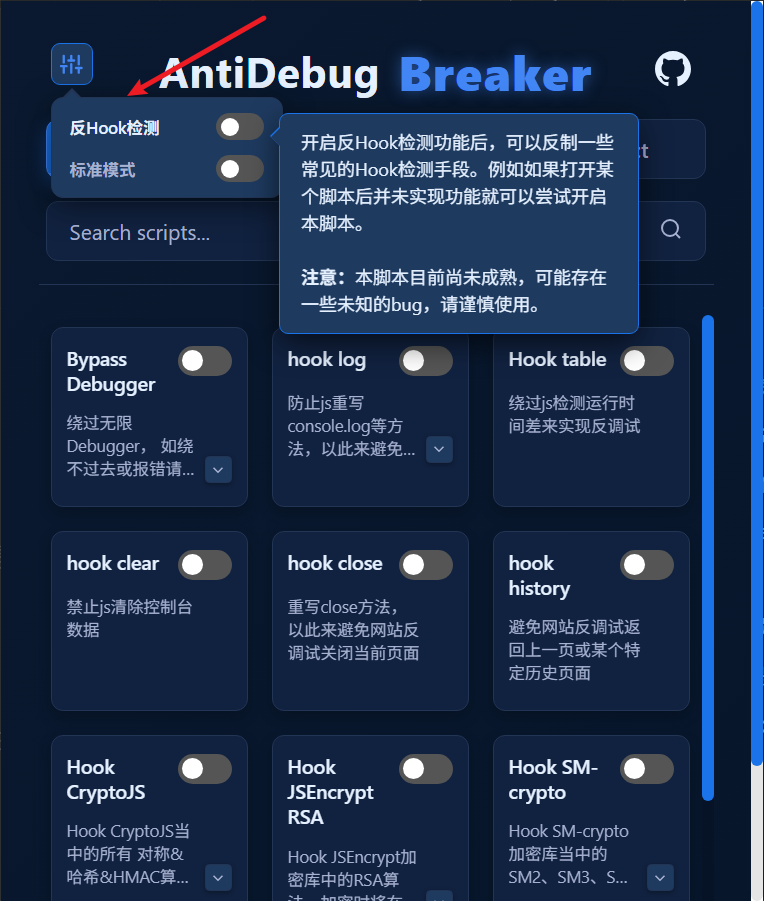
  • The website may use anti-hook techniques. Try enabling anti-hook detection. If this still does not work, contact me with an example (WeChat: I-0xsdeo).
  • For pages accessed through the file:// protocol or localhost, see Quick Start > Notes.

# Q: Why don't keywords or fixed values configured in the Hook section take effect?

A: Reload the page to load the new settings.

# Script Questions

# Q: What should I do if Bypass Debugger doesn't work?

A: See Bypass Debugger for a solution. Another, more direct approach is to use Firefox to ignore breakpoints.

# Q: What should I do if the redirect interception script doesn't work?

A: See Locating JavaScript Redirect Code.

# Q: What if I still can't open DevTools with F12 after enabling the anti-debugging scripts?

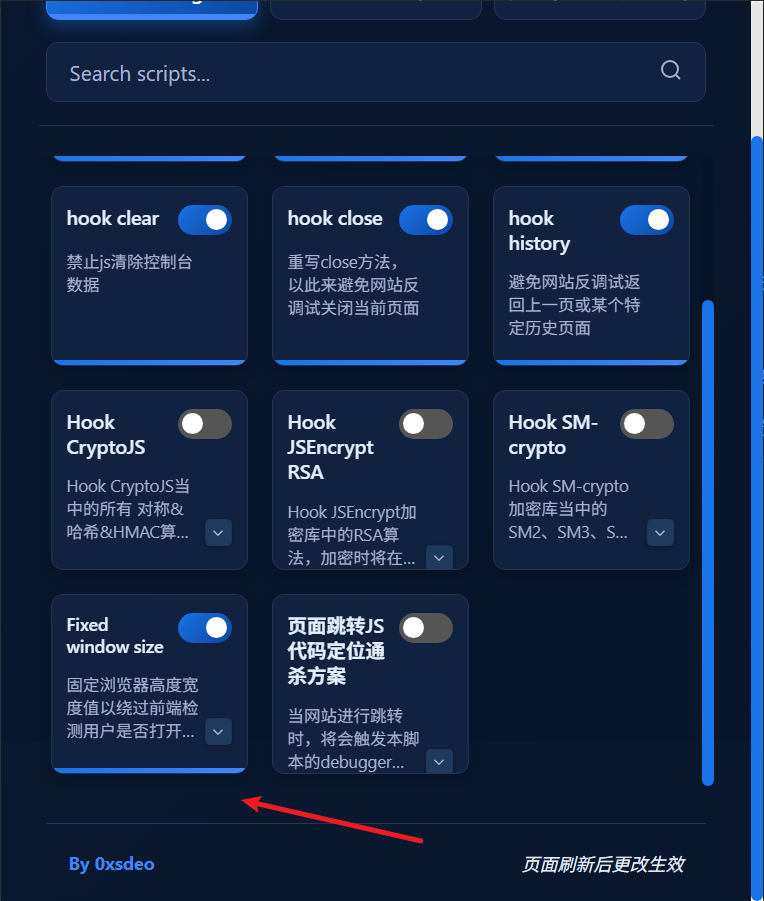
A: First, try enabling all of the following scripts:
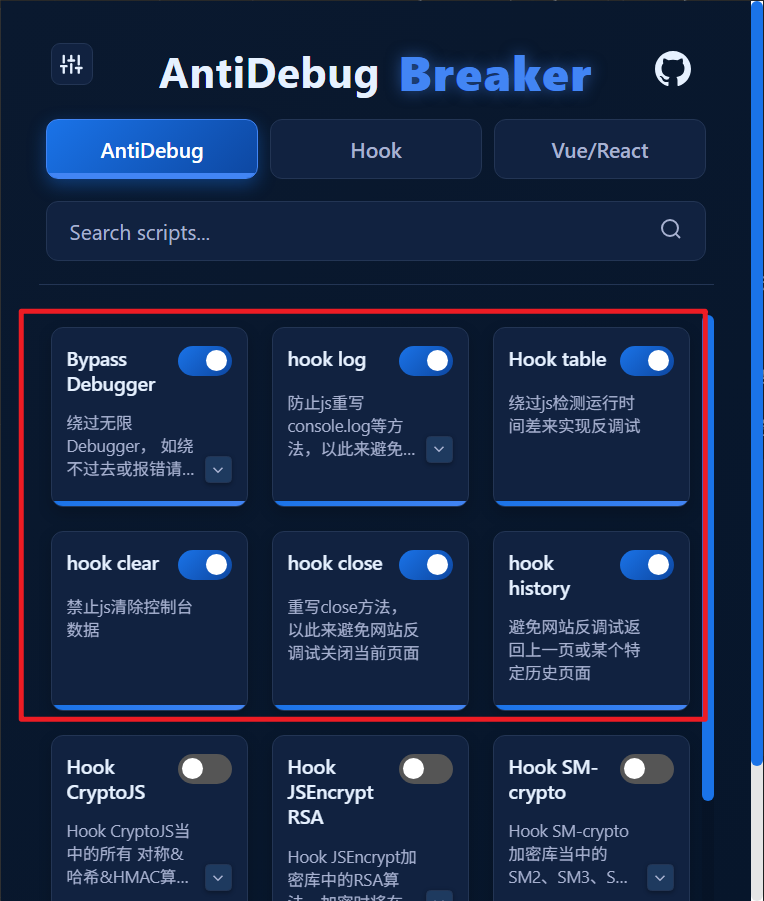

If you still cannot open DevTools, identify which situation applies:

  1. Right-clicking the website displays a message that blocks right-clicking or opening DevTools with F12.

For example:
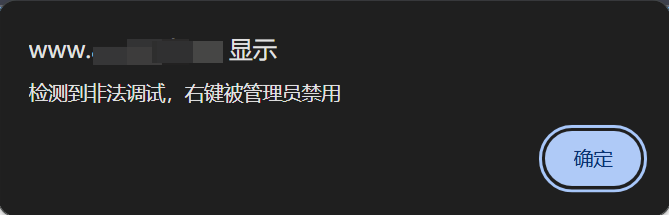
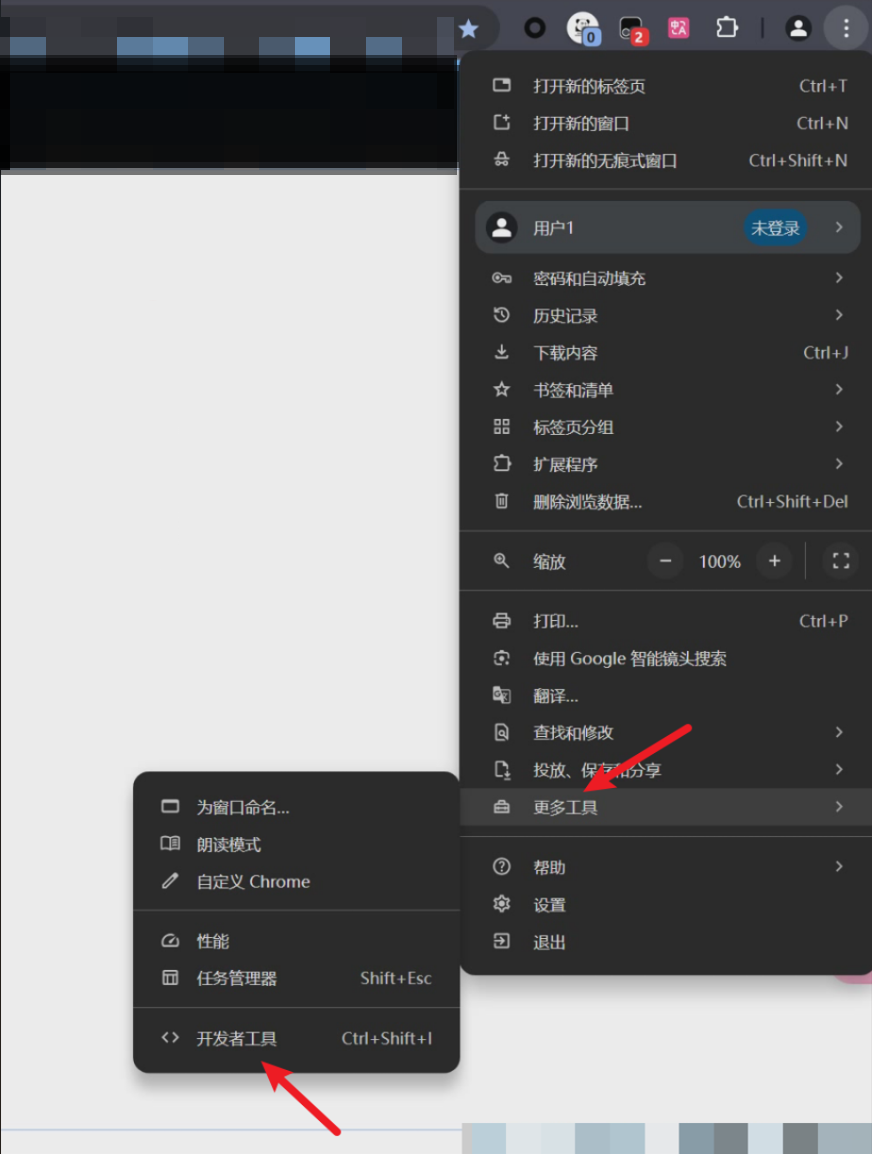
You can bypass this by opening DevTools through the browser menu. Here is an example in Chrome:
  1. The page redirects to another website.

See Locating JavaScript Redirect Code.

# Q: Why is nothing captured when I try to extract encryption parameters?

A: Possible reasons:

  1. console.log may have been disabled.

See Hook CryptoJS > FAQ.

  1. Encryption or decryption has not been triggered.

  2. The website may not use the corresponding encryption library (CryptoJS / JSEncrypt / SM-crypto).

# Q: How do I get the padding and cipher mode?

A: See Hook CryptoJS > How do I get the padding and cipher mode?.

# Q: Why can't I encrypt or decrypt using the captured parameters?

A: See Hook CryptoJS > Why can't I encrypt or decrypt?.

# Q: Why can't I extract Vue routes?

A: Possible reasons:

  1. The page does not use Vue.
  2. The page does not use Vue Router.

# Q: Why am I redirected to the login page after clearing navigation guards?

A: Try the following:

  1. Enable the Clear Redirects script.
  2. If redirects still occur, see Vue > Redirects still occur after clearing.

# Q: Why can't the React script retrieve routes?

A: This script is still in an early stage of development and may not retrieve all routes. If you encounter this issue, please contact me with an example (WeChat: I-0xsdeo).

# Technical Questions

# Q: How do I report a bug or request a feature?

A: Submit a report on GitHub Issues (opens new window), or contact me (WeChat: I-0xsdeo).

Theme by Vdoing | Copyright ยฉ 2025-2026 0xsdeo
  • System
  • Light
  • Dark
  • Reading